

- Katılım
- 6 Mayıs 2022
- Mesajlar
- 45,967
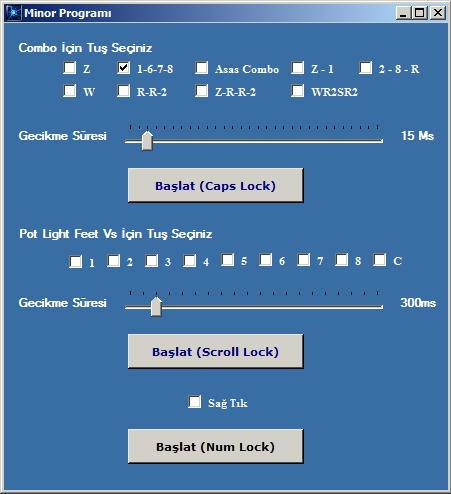
Nasıl Çalıştırıcam ?
1- Üst kısımda bulunan seçeneklerden birini veya istediklerinizi seçiyorsunuz.
2- Başlat (Caps Lock) Tuşuna basıyorsunuz.
3- Oyuna girip “Caps Lock” Tuşuyla hileyi çalıştırıp durdurabilirsiniz.
Ziyaretçiler için gizlenmiş link,görmek için üye olmalısınız!
Giriş yap veya üye ol.
CapsLock Minör Programı Nedir?
Knight Online özel sunucularında oynayan oyuncuların karşılaştığı en büyük zorluklardan birisi de CapsLock tuşunun sürekli açık kalmasıdır. Özellikle bazı geliştirici ve test süreçlerinde CapsLock tuşunun aktif olması istenmeyebilir. Bu durumda CapsLock Minör Programı devreye girer. Bu program, kullanıcıların CapsLock tuşunun kontrolünü kolaylaştırmalarına yardımcı olur.
Neden CapsLock Minör Kullanılır?
Knight Online özel sunucularında (örneğin USKO, ROFD, Lycaon, Felankor gibi sunucularda) geliştirme sürecinde bazı komutlar küçük harfle yazılırken CapsLock açık kalırsa bu komutlar beklendiği gibi çalışmayabilir. Özellikle KO Bot, KO Dev veya KO Emulator üzerinde test yapan geliştiriciler için CapsLock Minör, bu tür hataları engellemek adına oldukça faydalıdır.
CapsLock Minör Programının Özellikleri
1. Otomatik Devre Dışı Bırakma: CapsLock Minör, belirlenen zaman aralıklarında CapsLock tuşunu otomatik olarak devre dışı bırakabilir.
2. Kolay Kurulum: Program, sade bir arayüze sahip olduğu için kullanımı oldukça basittir. Sadece birkaç ayarla CapsLock tuşu kontrol altına alınabilir.
3. Hafif ve Stabil: Knight Online özel sunucularında çalışan geliştiriciler için tasarlanmıştır. Sistem kaynaklarını minimum düzeyde kullanır.
Knight Online Özel Sunucularında CapsLock Minör Kullanımı
Knight Online özel sunucularında (pserver), özellikle geliştirme ve test aşamasında CapsLock Minör kullanımı yaygınlaşmıştır. Oyun içi komutlar, bot sistemleri ya da addonlarla yapılan işlemler sırasında CapsLock açık kalırsa, bazı tuş kombinasyonları ya da komutlar düzgün çalışmayabilir. Bu durumda CapsLock Minör, kullanıcıya zaman kazandıran bir çözümdür.
CapsLock Minör ile Güvenlik
CapsLock Minör, sadece klavye kontrolü sağladığı için güvenlik açısından zararlı değildir. Ancak bazı antivirüs yazılımları programı tehlikeli görebilir. Bu nedenle güvenilir kaynaktan indirilen sürümler kullanılmalıdır. Knight Lobby üzerinden sağlanan güvenli bağlantılar sayesinde kullanıcılar bu tür programlara kolayca ulaşabilir.
CapsLock Minör ile Knight Online Geliştirme Süreci
Knight Online geliştirme sürecinde (KO Dev) CapsLock Minör, geliştiricilere zaman kazandıran küçük ama etkili bir araçtır. Özellikle scripting, macro bot oluşturma ya da KO Emulator üzerinde test yaparken CapsLock tuşunun kontrolü önemlidir. Bu program sayesinde hatalar azalır ve geliştirme süresi kısalır.
Sonuç
CapsLock Minör, Knight Online özel sunucularında geliştirme ve oyun deneyimi yaşamak isteyen kullanıcılar için önemli bir araçtır. Hızlı, stabil ve güvenli kullanımıyla CapsLock sorunlarına çözüm sunar. Knight Lobby üzerinden erişilebilecek bu tür yardımcı programlar, özel sunucu deneyimini daha verimli hale getirir.
What is CapsLock Minor Program?
One of the biggest challenges faced by players playing on Knight Online private servers is the CapsLock key staying on constantly. Especially during some development and testing processes, having CapsLock active may not be desired. In such cases, the CapsLock Minor Program comes into play. This program helps users easily control the CapsLock key.
Why is CapsLock Minor Used?
In Knight Online private servers (such as USKO, ROFD, Lycaon, Felankor), during development phases, certain commands might need to be written in lowercase. If CapsLock remains active, these commands might not work as expected. For developers working with KO Bot, KO Dev, or KO Emulator, CapsLock Minor serves as a helpful solution to prevent such errors.
Features of the CapsLock Minor Program
1. Auto Disable: CapsLock Minor can automatically disable the CapsLock key at specified intervals.
2. Easy Installation: The program has a simple interface, making it very easy to use. Just a few settings allow you to take control of the CapsLock key.
3. Lightweight and Stable: Designed for developers working on Knight Online private servers, this program uses minimal system resources.
Using CapsLock Minor on Knight Online Private Servers
CapsLock Minor usage is common in Knight Online private servers (pserver), especially during development and testing phases. In-game commands, bot systems, or addon operations may not function correctly if CapsLock is left on. In such cases, CapsLock Minor is a time-saving solution for users.
Security with CapsLock Minor
CapsLock Minor is not harmful in terms of security since it only controls keyboard input. However, some antivirus programs may flag the program as dangerous. Therefore, only versions downloaded from trusted sources should be used. Through secure links provided by Knight Lobby, users can easily access such programs.
CapsLock Minor and Knight Online Development Process
In the Knight Online development process (KO Dev), CapsLock Minor is a small but effective tool that saves time for developers. Whether scripting, creating macro bots, or testing on KO Emulator, controlling the CapsLock key is important. With this program, errors are reduced and development time is shortened.
Conclusion
CapsLock Minor is an essential tool for users who want to develop or enhance their gaming experience on Knight Online private servers. Its fast, stable, and secure usage provides solutions to CapsLock-related issues. Such helper programs accessible through Knight Lobby make the private server experience more efficient.
